
1. Paid → Paid (Upgrade / Downgrade) #
When you switch between paid plans, MooseDesk applies the new plan immediately (not waiting for the current cycle to end). Shopify will apply the new recurring charge immediately (not waiting for the current cycle to end). This is required because Shopify allows only one active recurring charge per app at any time. Any existing charge will be cancelled and replaced by the new one.
As a result:
- A new billing cycle starts immediately
- AI reply quota is reset
- The included quota is recalculated based on the new plan. Overage usage and fees continue to accumulate within the current Shopify billing cycle.
2. Free & Early Bird plans (monthly reset logic) #
Free and Early Bird plans do NOT follow Shopify billing cycles. Instead, they use a calendar-month–based quota.
How quota works for Free & Early Bird:
- AI reply usage is counted per calendar month
- Quota resets on the 1st of each month at 00:00 UTC
- Changing plans does NOT reset quota within the same month
3. Paid → Free (or Early Bird) #
If a user downgrades from a paid plan to Free / Early Bird:
- Their AI usage continues counting within the current calendar month
- The quota is NOT reset
- The quota will reset only when the next month begins
This keeps Free plans consistent and prevents quota abuse.
Summary table #
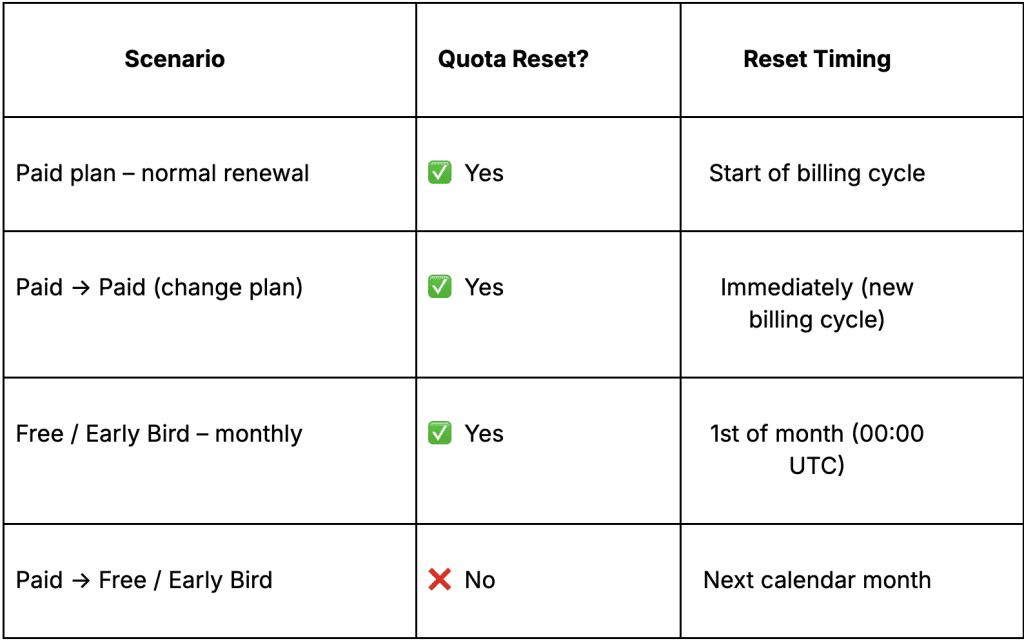
Support channels #
If you ever need assistance, our Help Center is packed with comprehensive guides and tutorials.
At MooseDesk, we’re always here to help. Our dedicated email and live chat teams are available around the clock. Drop us an email at help@moosedesk.com, or click the Live Chat icon located at the bottom left corner of the MooseDesk app, our official website, and even within this Help Center.