
How to reduce support tickets on your Shopify store with AI
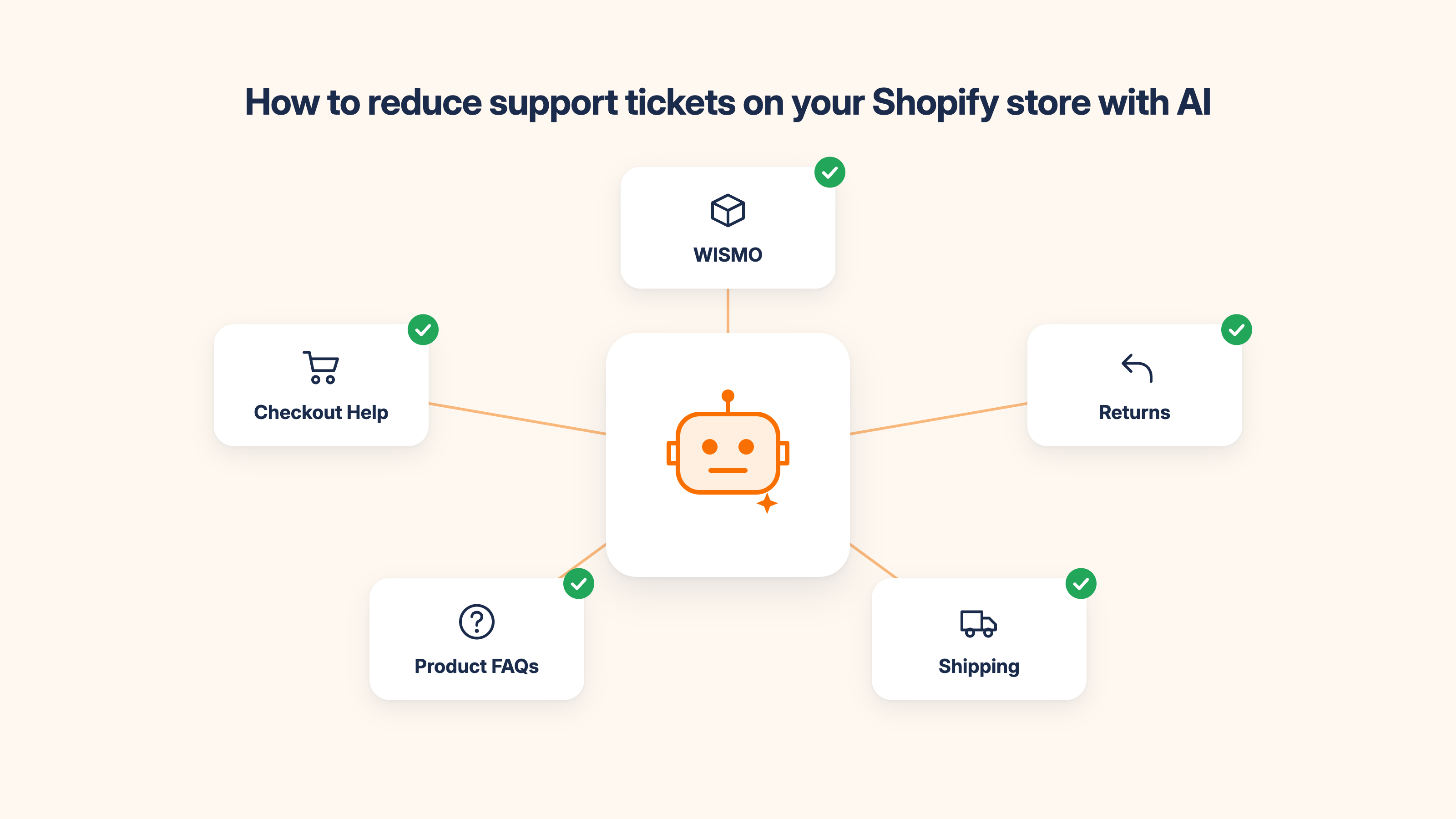
Table of contents
If you're spending 2-3 hours a day answering the same support questions (where's my order, what's your return policy, do you ship to this country): you don't have a staffing problem. You have a ticket volume problem. And most of it is automatable.
AI handles the repetitive, predictable majority of Shopify support tickets automatically. Your team handles the rest. For most stores, that split is somewhere between 60% automated and 85% automated, depending on how well the chatbot is trained. This article covers which ticket types AI reduces, what that looks like in practice with real numbers, and how to set it up.
For the full picture on AI chatbots for customer support, see: AI Chatbot for customer support: How to cut support tickets by 50%
Why support ticket volume is a Shopify problem (Not a staffing problem)
High ticket volume on Shopify stores isn't usually a sign that customers are unhappy or that the team is inefficient. It's a sign that the store hasn't automated the questions that have the same answer every time.
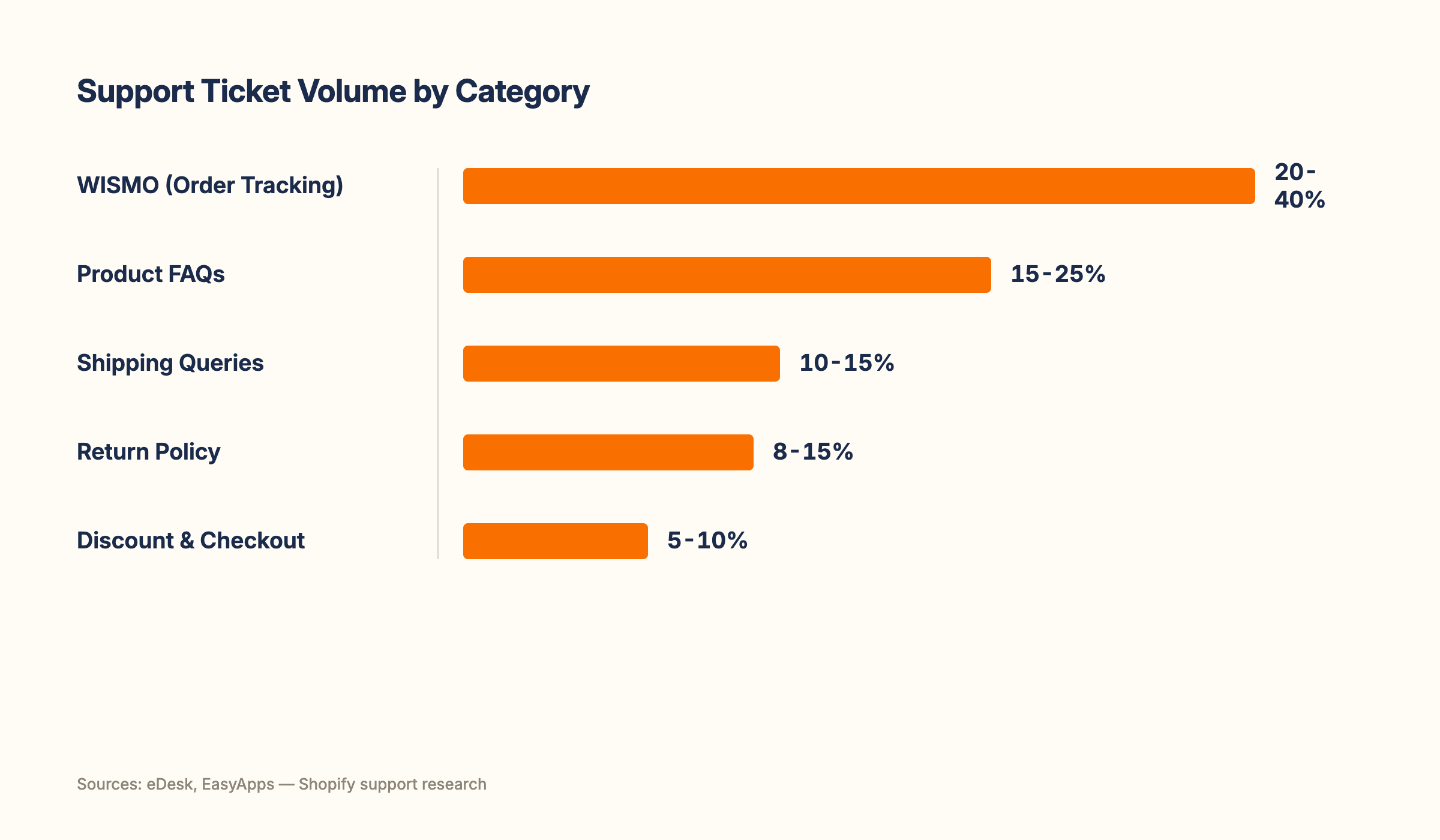
eDesk's research on ecommerce support shows WISMO queries ("Where is my order?") alone account for 20-40% of all support tickets in a typical Shopify store, rising above 50% during BFCM and peak periods. Return policy questions, shipping time queries, and product FAQs make up most of the rest. These aren't complex queries requiring human judgment. They're repeatable questions with repeatable answers.
Customer service automation is the process of using software to handle these repetitive queries without a human agent responding to each one. For Shopify stores, this typically means an AI chatbot trained on your store's specific data (your return policy, your shipping zones, your product FAQs) that answers these questions instantly, 24/7, without anyone on your team involved. The result: your team stops spending their day on the questions that have the same answer every time, and starts spending it on the queries that genuinely need them.
The staffing fix doesn't solve the root problem. More agents answering the same repetitive questions doesn't reduce ticket volume. It just distributes the repetition across more people.
The 5 ticket types AI reduces most on Shopify stores
Not all tickets are equally automatable. These five categories account for 60-85% of the average Shopify store's support volume and are the highest-ROI targets for AI automation.
1. WISMO (Where is my order?): 20-40% of all tickets
WISMO is the single highest-volume automatable ticket type across virtually every Shopify store. An AI chatbot connected to Shopify's order data answers "where is my order?" in real time, pulling live tracking information and returning it instantly. A clothing store doing 500 orders per month with a 15% WISMO query rate generates 75 WISMO tickets per month. AI handles all 75 from day one of deployment. That's roughly 3-4 hours of agent time returned to the team every month from a single automated flow.
2. Return policy questions: 8-15% of tickets
"Can I return this?", "How long do I have to make a return?", "Do I pay for return shipping?" These have defined answers that don't change unless your policy does. A chatbot trained on your actual return policy answers them accurately every time. The most common failure mode: the chatbot's return policy is outdated. Set a monthly review to keep it current.
3. Shipping time and cost queries: 10-15% of tickets
"How long does shipping take to Canada?", "Do you offer free shipping?", "What are your express options?" A chatbot trained on your shipping zones, rates, and timelines answers these without human involvement. For stores selling internationally, this category often accounts for a disproportionate share of after-hours ticket volume: queries arriving when no one is online.
4. Product FAQs: 15-25% of tickets
Ingredients, sizing, compatibility, usage instructions. "Does this moisturiser contain fragrance?", "What size should I order for a UK 10?", "Is this compatible with iOS?" A skincare brand, a fashion store, and a tech accessories store all have versions of this category. A chatbot trained on your actual product descriptions answers these. A chatbot running on generic templates does not. This is where training quality matters most.
5. Discount code and checkout help: 5-10% of tickets
"My discount code isn't working", "Can I use two codes at once?", "I forgot to apply my code, can you add it?" These have defined answers and defined workflows. A chatbot can confirm whether a code is valid, explain the terms, and escalate the exceptions that need a human agent.
Combined, these five categories account for 60-85% of the average Shopify store's support ticket volume. Automating all five doesn't require a large team or a complex implementation. It requires a well-trained AI chatbot and a few hours of knowledge base setup.
What ticket reduction actually looks like in practice
These benchmarks give you a realistic picture of what to expect from a well-configured AI setup.
From eDesk's research on ecommerce support automation: WISMO automation alone handles 20-40% of total ticket volume from day one. From EasyApps' research on Shopify support automation: automating the top 10 most common FAQ questions eliminates 50-70% of manual ticket volume. A well-configured AI chatbot achieves a deflection rate of 40-65% within the first 60 days, meaning 40-65% of all incoming queries are resolved without any human involvement. Gartner projects AI will autonomously resolve 80% of common customer service issues by 2029, and the trend is already visible in current Shopify deployments.
What this looks like for a specific store:
A pet supplies store doing 800 orders per month receives approximately 120 support tickets monthly. Breakdown: 35 WISMO (29%), 20 return policy (17%), 18 shipping queries (15%), 25 product FAQs (21%), 10 discount and checkout (8%), 12 complex or other (10%). The first five categories total 108 tickets, all automatable. With AI handling them, the team manages only the 12 complex tickets per month. That's a 73% reduction in manual ticket handling from a single setup.
Realistic vs inflated expectations:
A 70-80% reduction is achievable for stores with high repetitive ticket volume and a well-trained chatbot. A 30-40% reduction is what generic, minimally configured chatbots actually deliver. The difference is training quality. Chatbots trained on actual store data (your real return policy language, your actual product descriptions, your specific shipping zones) significantly outperform chatbots running on default templates. This is the most important variable, and it's entirely within your control.
How to set up AI ticket reduction on Shopify
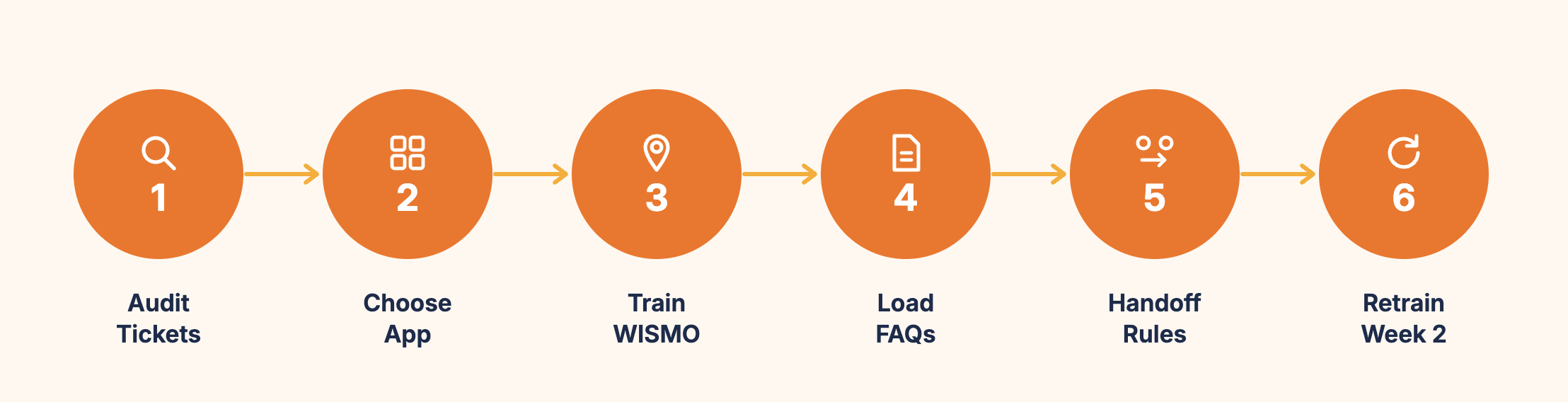
These six steps move you from your current manual volume to meaningful automated reduction, in the right order for fastest time-to-value.
Step 1: Audit your current ticket data. Pull the last 30 days of tickets from your support inbox. Categorise them into the five types above plus "other". Count the totals. This gives you your store's actual automation opportunity, not a benchmark average, your real numbers. Stores that run this audit first consistently set up more effective chatbots than those who skip it.
Step 2: Choose a Shopify-native AI chatbot. Look for four things: native Shopify order data access (for WISMO accuracy), no-code knowledge base setup, live chat for human handoff, and an integrated helpdesk to manage the tickets that do need a human. MooseDesk meets all four criteria, is Shopify-native, and includes AI chatbot, live chat, and helpdesk in one app. The key criterion is native order access. A chatbot that cannot read live Shopify order data cannot answer WISMO queries accurately.
Step 3: Train on WISMO first. Connect the chatbot to Shopify's order management. Test with 10 real order numbers. Verify the tracking information is accurate and the response is clear. This single flow typically handles 20-40% of your ticket volume from day one and gives you a visible, measurable win within the first week.
Step 4: Load your top 10-15 FAQ answers. Use your ticket audit from Step 1 to identify the most common questions. Write specific answers using your store's actual policies and product information. Do not use generic templates. Test each one with the exact phrasing your customers use.
Step 5: Configure human handoff rules. Define what the chatbot escalates: complex disputes, distressed customers, policy exceptions, and explicit requests for a human agent. Set the handoff to pass the full conversation context to the live agent so the customer never has to repeat themselves.
Step 6: Run for two weeks, then retrain. Check the fallback logs daily for the first two weeks. Every unanswered question in the logs is a training gap. Close the most common ones in week two. Most stores close 80-90% of their training gaps within the first three weeks of active monitoring.
Here's something worth sharing from our own experience: the team behind MooseDesk has been building Shopify solutions for over 10 years, and MooseDesk launched in 2023 with this exact setup process built into the product. The mistake we see most consistently in the first week is merchants loading their polished FAQ copy rather than actual customer language. Their return policy page says "returns are accepted within 30 days of purchase date." Their customers ask "can I return something I bought three weeks ago?" Those two phrasings don't match and the chatbot misses the query. Training on your customers' actual language, taken directly from your ticket history, is what produces the deflection rates the benchmarks show. The chatbot doesn't need better AI. It needs better training data.
For the full installation guide, see: How to Add Live Chat and AI Chatbot to Your Shopify Store
Also see: How to Automate Customer Support on Shopify for the full configuration framework including escalation rules and brand voice setup.
What to measure to know it's working
Three metrics tell you whether AI is actually reducing your support ticket volume.
1. Total ticket volume (week-over-week). The headline number. Track total incoming queries for the 30 days before AI launch and compare to the 30 days after. A meaningful reduction (20-40% in the first month for a well-trained chatbot) confirms the automation is working. A flat or increasing number means the chatbot isn't being triggered correctly or the knowledge base has significant gaps.
2. Deflection rate. The percentage of incoming queries the chatbot resolves without a human agent. Target: 40-65% within the first 60 days. Below 30% after four weeks means the chatbot needs significant knowledge base work. Start by identifying the top 10 unanswered question types in the fallback logs and adding those to the knowledge base.
3. Time to first response for the human queue. As ticket volume drops, your team's response time on the remaining tickets should improve. This is the quality-of-life metric that demonstrates the real value of automation to your support team. Fewer tickets handled by humans means better, faster service on the ones that genuinely need attention.
For the full chatbot metrics framework, see: AI chatbot metrics: What to track to know if It's actually working
Frequently asked questions about reducing Shopify support tickets with AI
What is the best AI tool to reduce Shopify support tickets?
Look for a Shopify-native AI chatbot that connects directly to your order data and product catalog through the Shopify API. Native order access is the most important criterion because it determines whether the chatbot can answer WISMO queries accurately in real time. For a full comparison of current Shopify AI chatbot options: Best AI Chatbot Apps for Shopify.
How do I set up AI for Shopify customer support?
Install a Shopify-native AI chatbot from the App Store, connect it to your order and product data, and train it on your top 10-15 FAQ answers using your actual customers' language from your ticket history. Most stores are live within 30 minutes. The knowledge base training takes 1-3 hours depending on catalog size and determines how accurate the chatbot is from day one. For the step-by-step guide: How to Add Live Chat and AI Chatbot to Your Shopify Store.
What are the pros and cons of AI for Shopify customer service?
Pros: handles repetitive queries 24/7 without human involvement, reduces ticket volume by 40-65% for well-trained chatbots, delivers instant responses for common questions, scales during BFCM and seasonal peaks without additional staffing. Cons: requires accurate training data to perform well (generic templates produce poor results), cannot handle complex disputes or emotionally sensitive situations reliably, needs regular review and updates when policies or products change. The biggest factor in whether you see the upper or lower end of those performance ranges is training quality, not the AI technology itself.
How quickly will I see results from AI support automation?
WISMO automation delivers results from day one. Any query about order status is handled automatically from the moment the chatbot is connected to Shopify's live order data. FAQ deflection builds over the first 2-3 weeks as you identify and close knowledge base gaps. Most stores see a meaningful reduction in manual ticket volume within the first 30 days, with deflection rate stabilising between 40-65% by day 60.
Ticket volume is a solvable problem for most Shopify stores. The most effective way to reduce support tickets is not hiring more agents. It's automating the questions that have the same answer every time. That makes them automatable. The stores that solve this problem fastest are the ones that audit their actual ticket data first, train on real customer language rather than generic templates, and commit to two weeks of active refinement after launch.
The payoff isn't just fewer tickets. It's your team spending their time on the conversations that actually need them.
For the complete picture on AI chatbots for Shopify, see our complete guide to AI chatbots for ecommerce.
MooseDesk is a Shopify-native AI chatbot that connects to your order data, handles WISMO and FAQ queries automatically, and passes complex tickets to your team with full context. Most stores see meaningful ticket reduction within the first 30 days.
Try MooseDesk
Cut your ticket volume and give your team their day back.
Free plan available. 1-min setup. 24/7 Support.