
How to automate customer support on Shopify (Without losing the human touch)
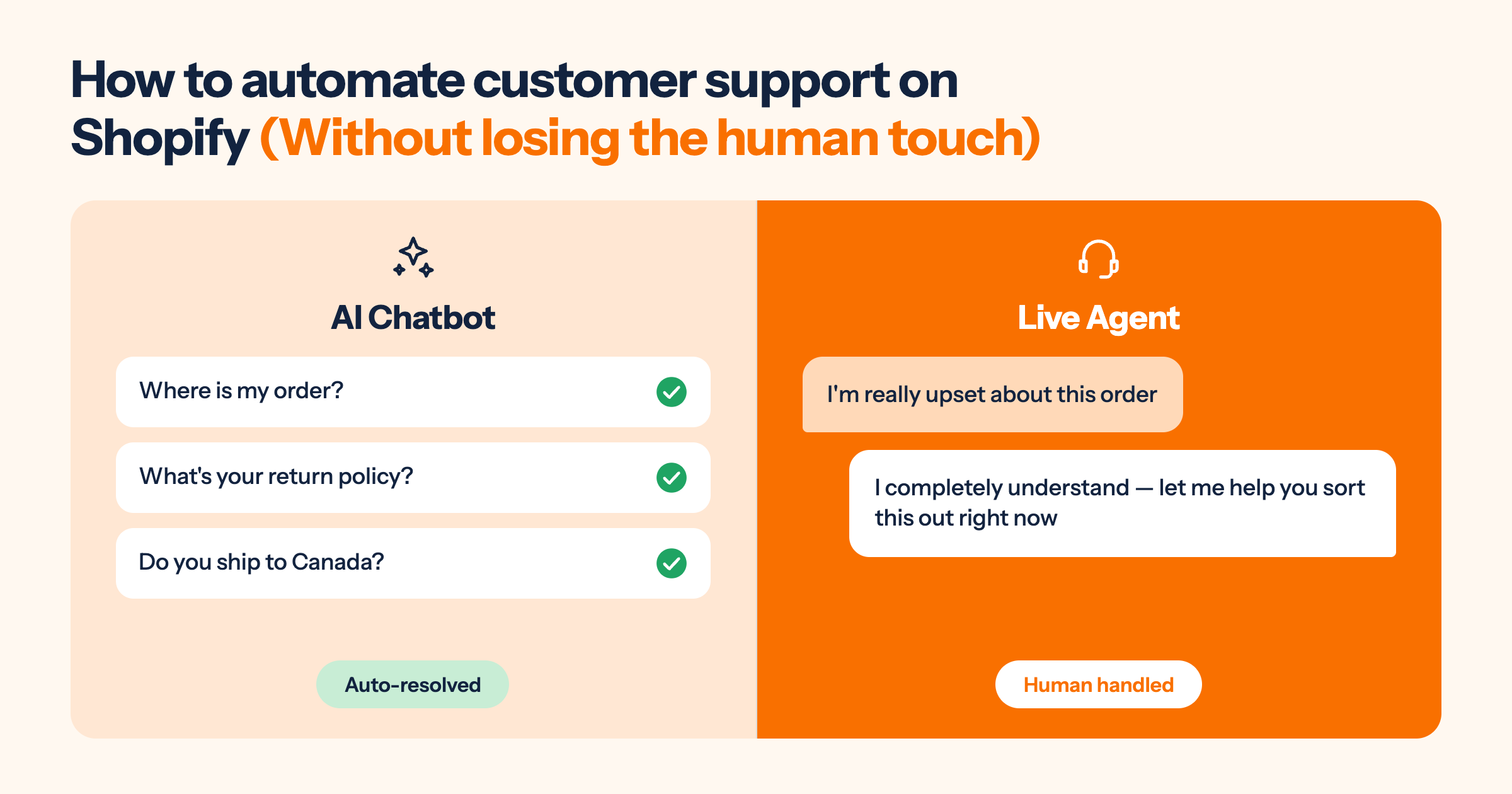
Table of contents
Most Shopify merchants know they need to automate customer support. The reason they haven't is the same worry every time: what if it sounds robotic? What if customers can tell they're talking to a bot and feel like the store doesn't care?
The honest answer: poorly configured automation sounds robotic. Well-configured automation sounds fast, accurate, and helpful. That's exactly what customers want. The difference isn't the technology. It's how you configure it.
This article covers what to automate, what to keep human, and how to set up the handoff so customers never feel abandoned by the process.
For how AI chatbots specifically reduce support volume, see: AI chatbot for customer support: How to cut support tickets by 50%
What does it actually mean to automate customer support?
Automating customer support means using software to respond to, route, or resolve customer queries without a human agent handling each one individually. For Shopify stores, this typically means an AI chatbot that answers common questions automatically (order tracking, return policy, product FAQs), combined with a helpdesk that routes and tracks everything that needs a human.
What it doesn't mean: replacing your support team. The right frame is division of labour. Automation handles the predictable, repeatable majority. Your team handles the situations that genuinely need a person.
The "human touch" misconception is worth addressing directly. Most merchants assume automation sounds robotic because they've experienced bad automation: the phone trees that don't understand natural language, the FAQ bots that respond to "I need help with my order" with a link to a generic help page. Modern AI chatbots trained on your actual store data respond accurately in plain English. A customer asking "do I have to pay for return shipping?" gets a direct answer based on your actual return policy. That's not robotic. It's faster than most human responses.
What makes automated customer service feel cold isn't the technology. It's vague answers, wrong information, failure to escalate when the query is complex, and making the customer repeat themselves when they do reach a human. These are configuration failures, not technology failures. Fix the configuration and the cold feeling disappears.
What to automate (And what to keep human)
This is the decision most merchants get wrong. They either automate too much and frustrate customers, or automate too little and wonder why it's not saving them any time.
Here's a clear framework:
| AUTOMATE THIS | KEEP THIS HUMAN |
|---|---|
| Order tracking (WISMO) | Fraud claims and account security issues |
| Return policy questions | Highly distressed or upset customers |
| Shipping time and cost queries | Legal complaints and product liability |
| Product FAQs (ingredients, sizing, compatibility) | VIP customers and high-value order disputes |
| Discount code and checkout help | Complex custom order modifications |
| Post-purchase order status | Situations requiring a judgment call or policy exception |
| After-hours query acknowledgement | Any query where the customer has explicitly asked for a human |
The left column covers the queries that have defined, repeatable answers. According to eDesk's research on ecommerce support, WISMO queries alone account for 20-40% of all support tickets for a typical Shopify store. Automating just that one category returns significant time to your team from day one.
The right column covers queries where the outcome depends on judgment, empathy, or authority that only a human agent has access to. Gartner projects that AI will autonomously resolve 80% of common customer service issues by 2029. The 20% that remains human will always include the situations on that right side.
Three trigger types that should always escalate to a human, no exceptions:
1. Explicit distress signals. Words and phrases like "extremely upset", "this is unacceptable", "I want to speak to a manager", or "I'm going to leave a review." These should trigger an immediate transfer to a live agent. A customer who is already frustrated needs a human response within the same conversation, not another bot message.
2. Product safety or legal language. Any mention of injury, illness, allergic reaction, legal action, regulatory complaints, or product recalls. These should never be handled by an automated system regardless of the chatbot's quality.
3. Explicit requests for a human. "Let me speak to a real person", "I want to talk to someone", "can I get a human?" Never make a customer ask twice. The moment they request a human, route them.
For the full breakdown on when to use chatbot versus live chat, see: AI chatbot vs live chat: Which does your Shopify store actually need?
How to set up automation that doesn't feel robotic
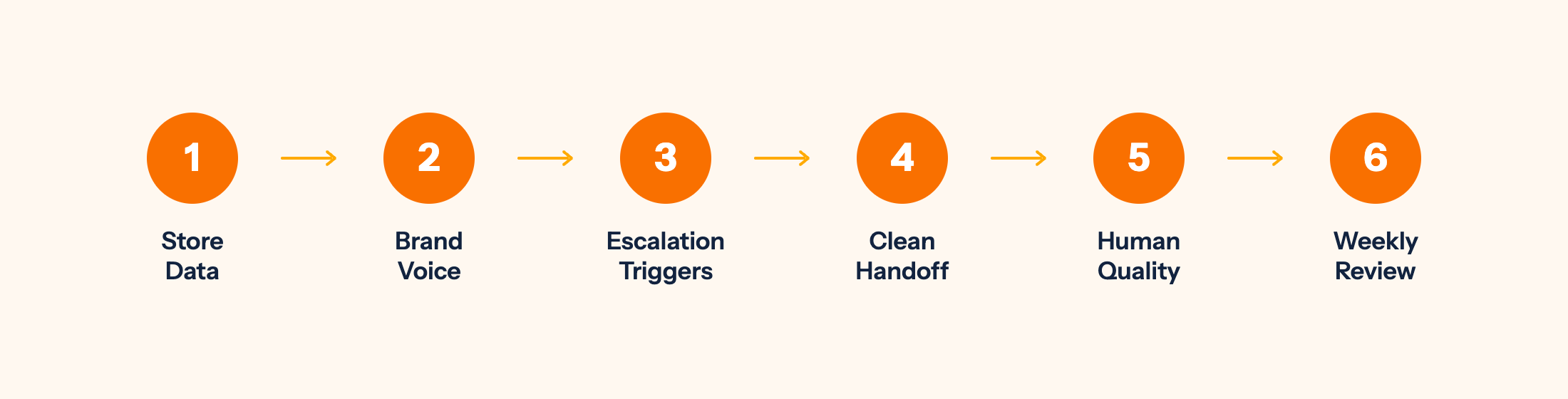
The configuration is where most merchants either win or lose the human touch question. These six steps produce automated customer service that feels like a fast, knowledgeable store assistant rather than a phone tree.
Step 1: Train on your actual store data, not default templates. The most common reason automated customer service sounds generic is that the chatbot is running on generic templates rather than your specific products, policies, and pricing. Load your actual return policy. Your actual shipping zones and estimated delivery times. Your actual product FAQs. A chatbot answering "do you ship to Canada?" with your real shipping rates and timelines sounds specific and credible. A chatbot answering with "please check our shipping page" sounds like it wasn't set up properly.
Step 2: Write chatbot responses in your brand voice. If your store uses a warm, casual tone ("hey there, happy to help!"), your chatbot should too. If your store is formal and professional ("thank you for contacting our support team"), configure that instead. The chatbot's responses are copywritable. Spend an hour writing them in your voice rather than leaving the default text. This is the single highest-impact change most merchants never make.
Step 3: Configure smart escalation triggers. Define the conditions that route a conversation from chatbot to live agent: the explicit distress phrases listed above, query types that require policy exceptions (refunds above a certain value, damage claims), customer segments (VIPs, orders above a threshold), and a conversation-length fallback (if the chatbot hasn't resolved a query within 3 exchanges, proactively offer a human handoff). Escalation should feel like a natural progression, not a system error message.
Step 4: Make the handoff clean. When a conversation moves from the chatbot to a live agent, the agent should receive the full conversation history with context attached. The customer should never have to repeat their question. If a shopper spent four messages explaining their situation to the chatbot, the live agent sees all of it before typing a single word. A customer who gets a smooth handoff to a human will forgive a chatbot limitation. A customer who has to start over from scratch will not.
Step 5: Use automation to improve human response quality, not just speed. Automated ticket tagging, order status pre-loading, and customer history lookup mean your human agents arrive in each conversation with full context before they respond. This is part of the human touch too. A support agent who already knows the customer's order status, previous contact history, and the conversation so far gives a more personal, accurate response than one who starts cold.
Step 6: Review and refine weekly for the first month. Check the chat logs for escalations that should have been handled automatically and automations that should have escalated. Adjust triggers and knowledge base content accordingly. Most stores reach a stable automated customer support configuration within 3-4 weeks of active monitoring.
Here's something worth sharing from our own experience: the team behind MooseDesk has been building Shopify solutions for over 10 years, and MooseDesk launched in 2023 with automated support flows built into the core product. The configuration mistake we see most often in the first two weeks is escalation triggers that are either too broad (the chatbot escalates everything, defeating the purpose of automation) or too narrow (the chatbot handles queries it should pass to a human, and customers sense it). Getting escalation triggers right matters more than getting the chatbot answers right. A customer who gets a clean handoff to a human will forgive a chatbot limitation. A customer who feels trapped in an automated loop will not.
For the full installation guide, see: How to add live chat and AI chatbot to your Shopify store
Keeping the human touch inside an automated system
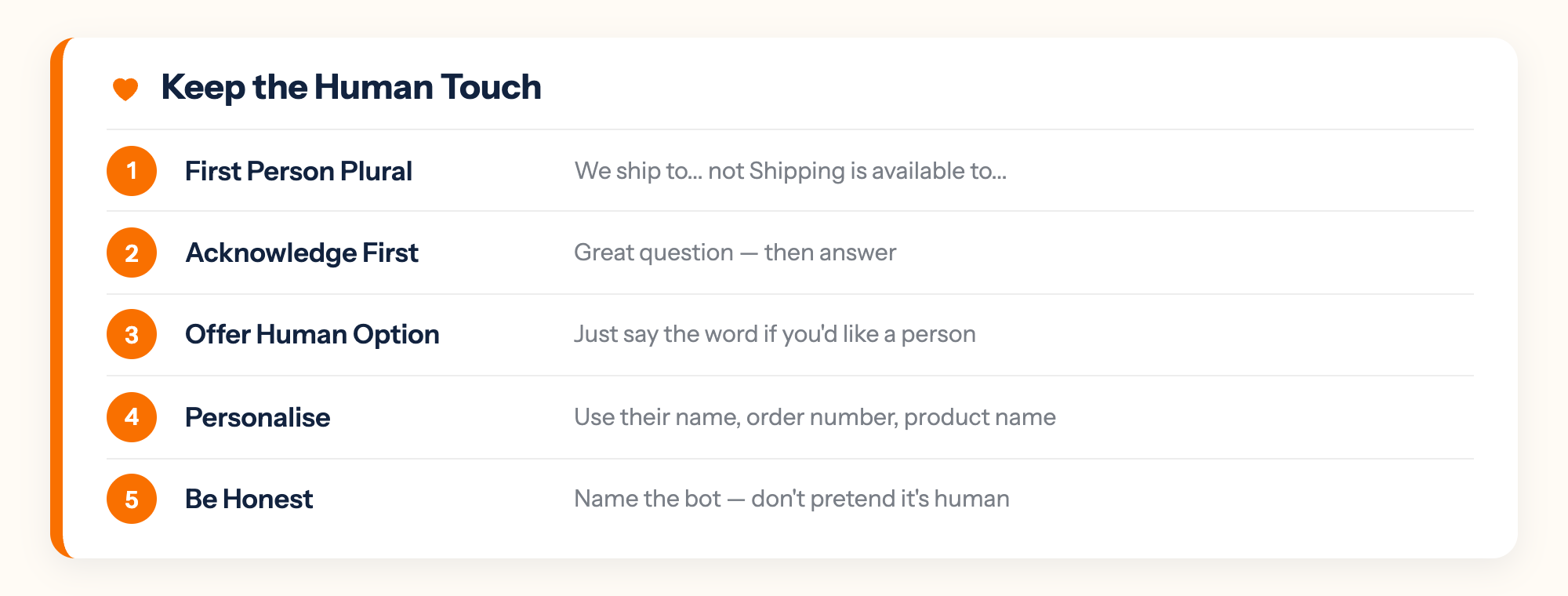
Automation and warmth are not opposites. These five practices keep the human feel intact across automated interactions.
1. Write chatbot responses in first person plural. "We ship to Australia in 7-10 business days" feels warmer than "Shipping to Australia is available." Small language choices compound across thousands of interactions and create a consistent sense that there's a team behind the tool.
2. Acknowledge before answering. "Great question: here's how our return policy works:" takes one extra line and reads significantly more human than jumping straight to the policy text. This applies to how you write the chatbot's response templates, not to adding empty filler.
3. Offer a human option proactively. At the end of any chatbot resolution, include: "If you'd like to speak with one of our team members, just say the word." This turns the chatbot from a barrier into a gateway. Customers who feel they could reach a person at any time are far less frustrated by the automated layer.
4. Personalise where your data allows. "Hi Sarah" if the customer is logged in. "Your order #4521" rather than "your order." "The navy hoodie in size M" rather than "your item." Small specificity signals that the system knows who it's talking to, which is what makes a support experience feel personal.
5. Be honest about what the chatbot is. Naming the chatbot after a human and not disclosing it's an AI erodes trust the moment the customer realises. And they will realise. Name it honestly. "Hi, I'm Moose, MooseDesk's AI assistant. I can help with orders, returns, and product questions" sets accurate expectations and gets immediately accepted. Honesty about the tool's nature is itself a form of respect for the customer.
What to measure to know if it's working
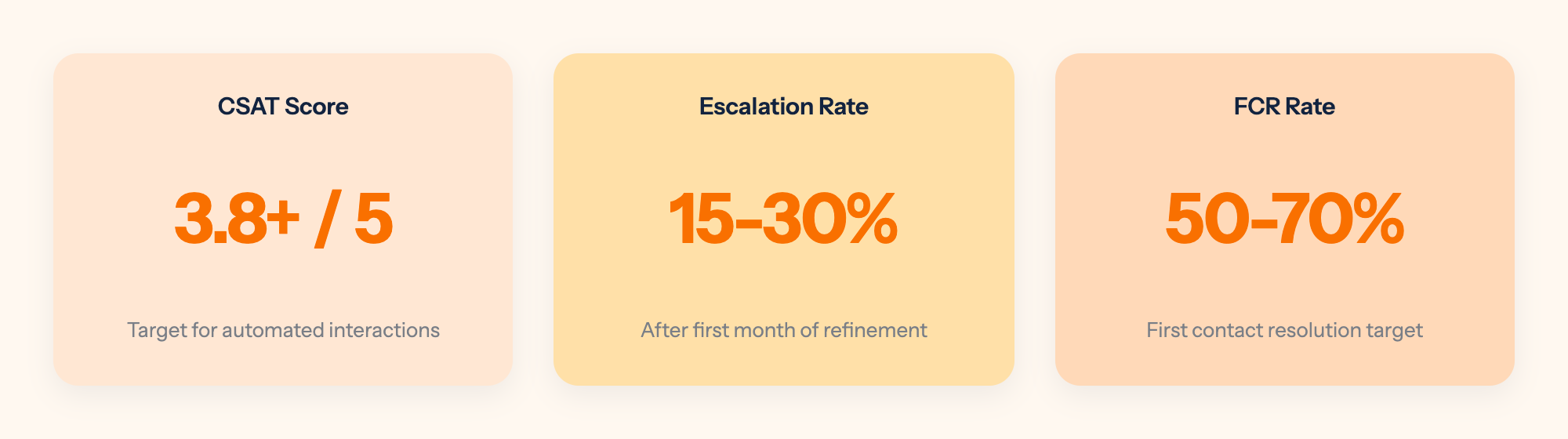
Three numbers tell you whether your automated customer support is working without compromising quality.
1. CSAT on automated conversations. Customer satisfaction score for chatbot-resolved interactions. If CSAT on automated conversations matches or exceeds CSAT on human-resolved ones, the automation is performing at the right quality level. Target: 3.8 or above out of 5 for automated interactions.
2. Escalation rate. The percentage of conversations transferred to a live agent. Target: 15-30% after the first month of configuration refinement. If escalation rate is very low (under 10%), check that escalation triggers are actually firing. That number may mean the chatbot is failing silently rather than escalating correctly.
3. First contact resolution rate. The percentage of queries resolved in a single interaction without a follow-up. This measures whether automation is actually resolving queries or just deferring them. Target: 50-70% for well-configured automated support. Below 40% means the chatbot knowledge base needs significant work.
For the full metrics framework, see: AI chatbot metrics: What to track to know if it's actually working
Frequently asked questions about automating customer support on Shopify
What is a Shopify AI agent for customer support?
A Shopify AI agent is software that handles customer support queries automatically. It connects to your Shopify store's order data, product catalog, and customer records to answer questions in real time (order status, returns, product FAQs) without a human agent responding to each one. The most effective AI agents for Shopify are native to the platform, meaning they access your store data directly through the Shopify API rather than through a manual sync or third-party connector.
Can I automate Shopify customer service without it feeling robotic?
Yes, with the right configuration. The robotic feel comes from vague answers, wrong information, and failure to escalate when the query is complex. Not from automation itself. A chatbot trained on your actual store data, written in your brand voice, and configured with clear escalation triggers gives customers accurate answers quickly. That's not robotic. It's fast and helpful, which is what most customers want. The configuration decisions in this article (brand voice, escalation triggers, the handoff process) are what separate automation that feels human from automation that doesn't.
What is the best AI customer service tool for Shopify?
Look for a Shopify-native tool that connects directly to your order and product data, includes both AI chatbot and live chat, and gives you a helpdesk to manage escalated tickets in one place. For a full comparison of current options, see: Best AI Chatbot Apps for Shopify.
How long does it take to set up automated customer support on Shopify?
Technical installation from the Shopify App Store takes under 30 minutes. Training the chatbot on your specific store data (return policy, shipping rules, product FAQs) takes 1-3 hours depending on catalog size. Most stores reach a stable automated customer support configuration within 3-4 weeks of active monitoring and weekly refinement. The first two weeks involve the most active adjustments as you tune escalation triggers and close knowledge base gaps.
Automating customer support on Shopify isn't about removing the human from the process. It's about making sure humans focus only on the work that genuinely requires them. Your team's time is finite. Automation gives it back for the interactions that actually need a person: the complex disputes, the upset customers, the high-value relationships that deserve full attention.
For the complete picture on AI chatbots for Shopify, see our complete guide to AI chatbots for ecommerce.
MooseDesk gives you AI chatbot automation for the routine queries and live chat for the complex ones, in one Shopify-native app. Configure what to automate, set your escalation rules, and go live in under 30 minutes.
Try MooseDesk
Automate the routine. Keep your team for the conversations that matter.
Free plan available. 1-min setup. 24/7 Support.