
AI chatbot metrics: What to track to know if it's actually working
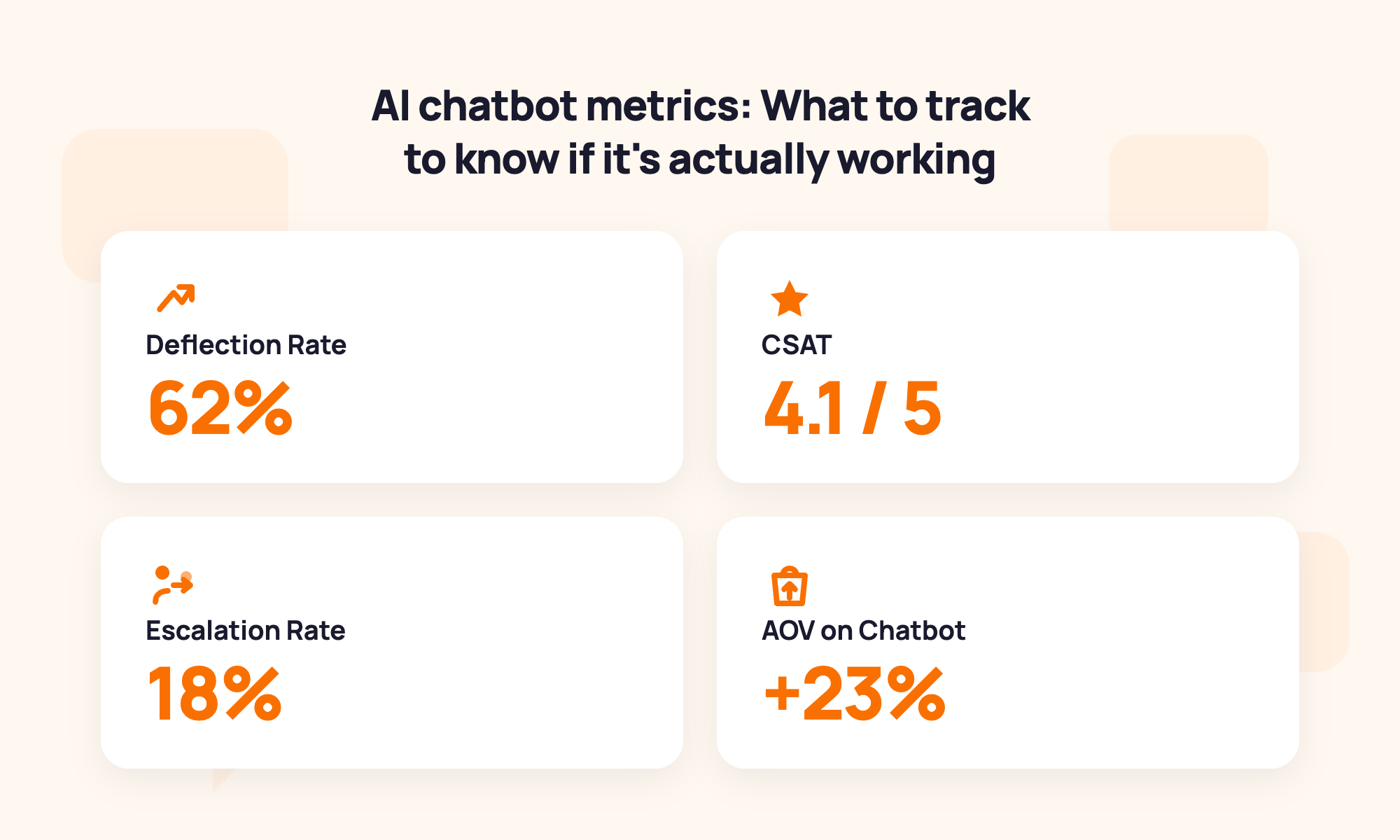
Table of contents
Total conversations. Average session length. Messages per conversation. If these are the chatbot analytics metrics you're checking, you're measuring activity, not results.
The key customer service metrics that tell you whether your AI chatbot is actually working are: deflection rate, first contact resolution, CSAT, escalation rate, fallback rate, chatbot-assisted conversion rate, and average order value on chatbot sessions. Seven numbers. Most merchants track zero of them correctly.
This article covers each metric with a plain-English definition, a realistic Shopify benchmark, and what to do when the number is off.
Already set up your chatbot? Good. If not, start here first: How to Add Live Chat and AI Chatbot to Your Shopify Store.
The two types of chatbot metrics (And why you need both)
Most merchants only track support metrics. But for a Shopify store, your chatbot should be doing two jobs simultaneously: reducing your support workload and contributing to revenue. You need metrics for both.
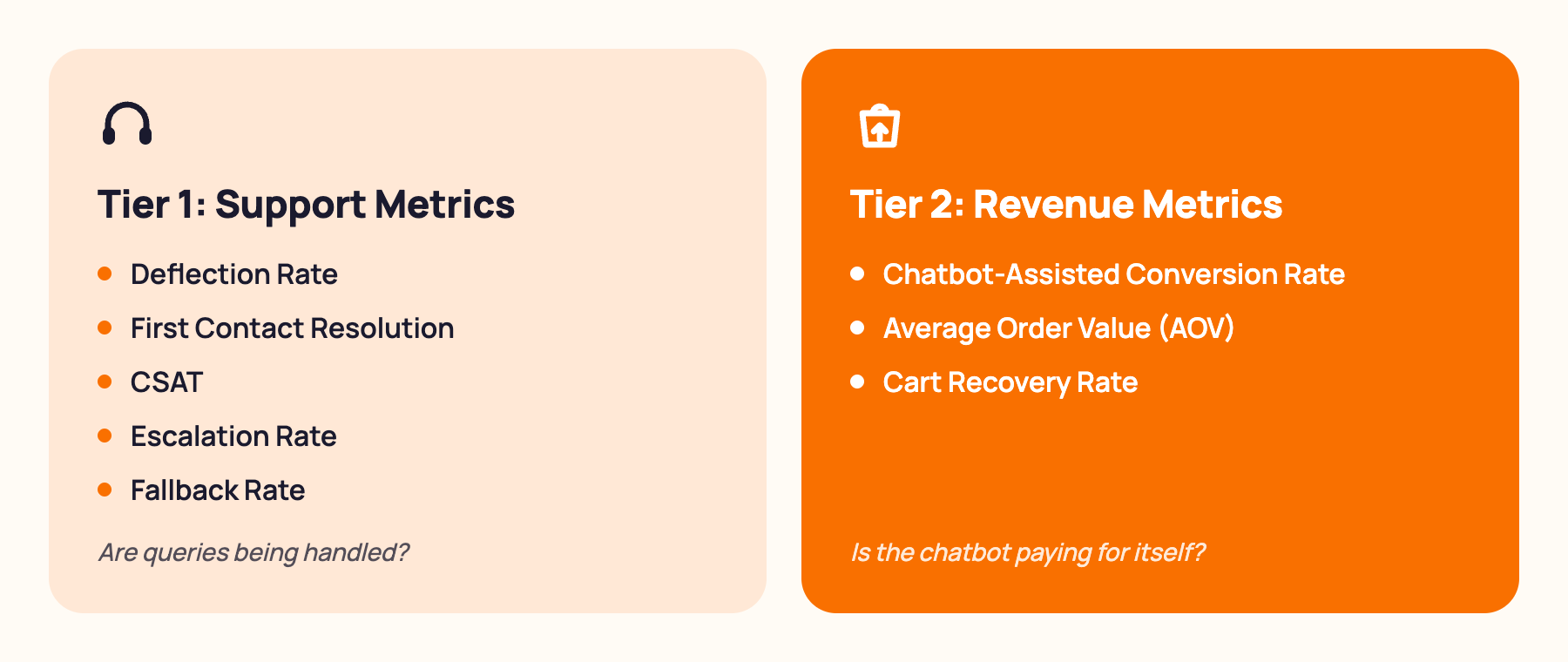
Tier 1: Support metrics tell you whether the bot is handling customer queries effectively and reducing your team's manual workload. These are your operational health indicators. They answer: is the chatbot working?
Tier 2: Revenue metrics tell you whether the bot is contributing to sales. Chatbot-assisted conversion rate, average order value on chatbot sessions, cart recovery rate. These are your growth indicators. They answer: is the chatbot paying for itself?
Most chatbot guides only cover Tier 1. This one covers both, because for a Shopify store, leaving Tier 2 unmeasured means leaving revenue on the table.
For a deeper look at the revenue side, see: How AI Chatbots Drive Sales for Shopify Stores.
Tier 1: The 5 support metrics every Shopify store should track
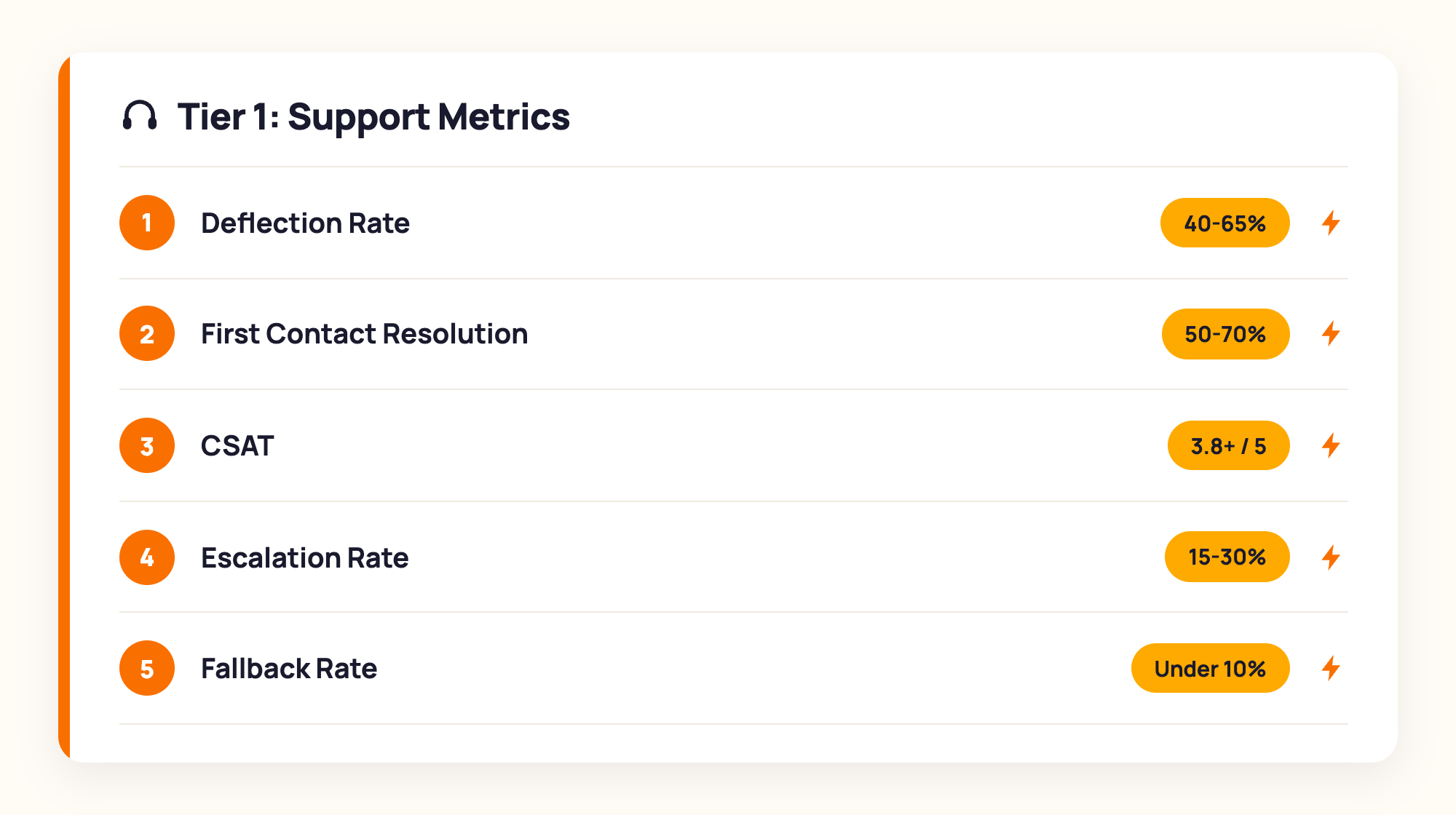
These five key customer service metrics tell you whether your chatbot is handling customer queries accurately, efficiently, and in a way customers find helpful. Check these weekly once you're past the initial launch period.
1. Deflection rate (also called containment rate)
Deflection rate is the percentage of incoming queries the chatbot resolves without a human agent stepping in. It's the single most direct measure of how much manual work your chatbot is removing.
Shopify benchmark: 40-65% within the first 60 days for a properly trained bot. A generic out-of-the-box chatbot typically achieves 20-30%.
If it's below 30%: pull the chat logs and identify the top 10 unanswered questions. Add accurate answers to the knowledge base using the customer's exact phrasing, not a polished rewrite. Retest after one week.
If it's above 80% in the first month: verify that escalation triggers are correctly configured. An artificially high deflection rate sometimes means complex queries are being incorrectly marked as resolved rather than escalated.
2. First contact resolution (FCR)
First contact resolution is the percentage of customer queries that are fully resolved in a single chatbot conversation, without the customer needing to follow up. It measures whether the chatbot is giving complete, accurate answers rather than partial ones that generate a second ticket.
Shopify benchmark: 50-70% for a well-trained chatbot covering FAQ, order tracking, and returns.
If it's below 40%: the chatbot is giving partial or inaccurate answers. Audit the most common re-contacted topics from your ticket history and update the relevant knowledge base entries.
3. Customer Satisfaction Score (CSAT)
CSAT is a post-conversation rating from the customer, typically on a 1-5 scale or with a thumbs-up/down prompt shown at the end of the chat. It measures whether customers found the interaction useful, not just whether it was technically resolved.
Shopify benchmark: a CSAT of 3.8 or above out of 5 for chatbot interactions. Below 3.5 consistently means the responses are feeling generic or unhelpful.
If it's below 3.5: read the 10 lowest-rated conversations directly. Look for: overly generic answers, incorrect information, failure to ask a clarifying question before answering, or abrupt escalation without a clear explanation. Fix response quality before scaling volume.
4. Escalation rate
Escalation rate is the percentage of chatbot conversations that get transferred to a human agent. A low escalation rate suggests the chatbot is handling queries well. Too low, and it may mean escalation triggers aren't firing when they should.
Shopify benchmark: 15-30% after the first month of refinement.
If it's above 40%: the chatbot is either under-trained or the handoff triggers are too sensitive. Review the escalation logs to see whether they're firing on genuinely complex queries or on routine ones the bot should handle. If it's below 10%: verify human handoff is available and working, and that escalation triggers are correctly configured.
5. Fallback rate
Fallback rate is the percentage of customer messages where the chatbot fails to understand the intent and returns a default response such as "I'm not sure I understand. Can you rephrase that?" It's your most direct signal of knowledge base gaps.
Shopify benchmark: under 10% for a well-trained chatbot.
If it's above 15%: these fallback triggers are your highest-priority training items. Export the fallback conversations for the past 14 days and add accurate answers for each unanswered question type.
Tier 2: The 3 revenue metrics that tell you whether your chatbot is growing your store
These metrics are what separate a chatbot that saves time from one that makes money. For Shopify stores using chatbots for product recommendations, cart recovery, and checkout support, Tier 2 data is where the business case lives.
1. Chatbot-assisted conversion rate
Chatbot-assisted conversion rate is the purchase conversion rate for website sessions where the chatbot was engaged, compared to sessions where it wasn't. It tells you whether the chatbot is actually influencing purchase decisions.
How to measure: your chatbot analytics dashboard should show this split. If not, use GA4 to segment sessions by chatbot engagement event and compare conversion rates between the two groups.
Shopify benchmark: chatbot-assisted sessions should convert at a rate at least 1.5 times higher than unassisted sessions for stores with product recommendation and proactive checkout support flows active.
If it's flat (no difference between assisted and unassisted): check whether product recommendation triggers are configured and whether the proactive checkout engagement flow is live. A chatbot operating purely as a reactive support tool won't influence conversion rate.
2. Average order value (AOV) on chatbot sessions
AOV on chatbot sessions is the average purchase value for orders where the customer interacted with the chatbot during their session. It measures whether upsell and cross-sell flows are working.
Shopify benchmark: AOV on chatbot sessions should run 15-30% higher than unassisted sessions for stores with product recommendation and upsell flows active.
If it's flat: check whether upsell triggers are configured and firing on the right cart content signals. Review which products are being recommended. Are they genuinely complementary, or are they generic suggestions that don't resonate with what the shopper actually wants?
3. Cart recovery rate
Cart recovery rate is the percentage of abandoned cart triggers (chatbot messages sent to shoppers who left mid-checkout) that result in a completed order.
Shopify benchmark: 10-20% recovery rate for well-timed, personalised recovery messages. Industry data from the Baymard Institute suggests AI-powered cart recovery with personalised messaging significantly outperforms generic email sequences, which typically recover 2-3%.
If it's below 5%: the recovery message is too generic, fires too late, or doesn't offer a strong enough reason to return. Test a time-limited incentive and personalise the message to reference the specific product left in the cart.
A note on attribution: a chatbot-assisted session is one where the chatbot was engaged at any point. A chatbot-attributed order is one where the chatbot was the last touchpoint before purchase. These are different numbers, and your analytics tool may report either one. MooseDesk's analytics dashboard shows the assisted vs unassisted split clearly so you can track both without needing a separate tool. Always clarify which figure you're looking at before drawing conclusions, especially for stores also running email or paid retargeting campaigns.
What to do when your metrics are off
Numbers without diagnostic next steps are just anxiety. Here's what to do when each scenario appears.
Low deflection rate and high fallback rate: the chatbot has significant knowledge gaps. Export the chat logs for the past 14 days, filter for escalations and fallbacks, list the top 10 unanswered questions, add accurate answers using the customer's exact phrasing, and retest after one week.
Low CSAT despite high deflection rate: the chatbot is resolving queries but doing it in a way that frustrates customers. Read the 10 lowest-rated conversations directly. Look for generic answers, incorrect information, failure to ask a clarifying question, or abrupt escalation without context. Fix response quality before increasing volume.
High escalation rate with good CSAT: the chatbot is escalating more than necessary, but customers are happy with the human handoff. Review the escalation triggers. Some may be firing too broadly. Narrow the conditions and monitor whether CSAT holds.
Flat conversion rate on chatbot sessions: the chatbot is handling support but not influencing purchases. Check whether proactive checkout engagement is live, whether product recommendation triggers are configured, and whether cart recovery messages are being sent. If none of these flows are active, the chatbot is operating as a pure support tool. Configure the revenue flows to unlock Tier 2 performance.
Flat AOV despite active upsell flows: the upsell suggestions are not resonating. Review which products are being recommended and whether they arrive at the right point in the conversation. Upsells work best after the shopper's intent is established, not as an immediate response to the first message.
How often should you check these metrics?
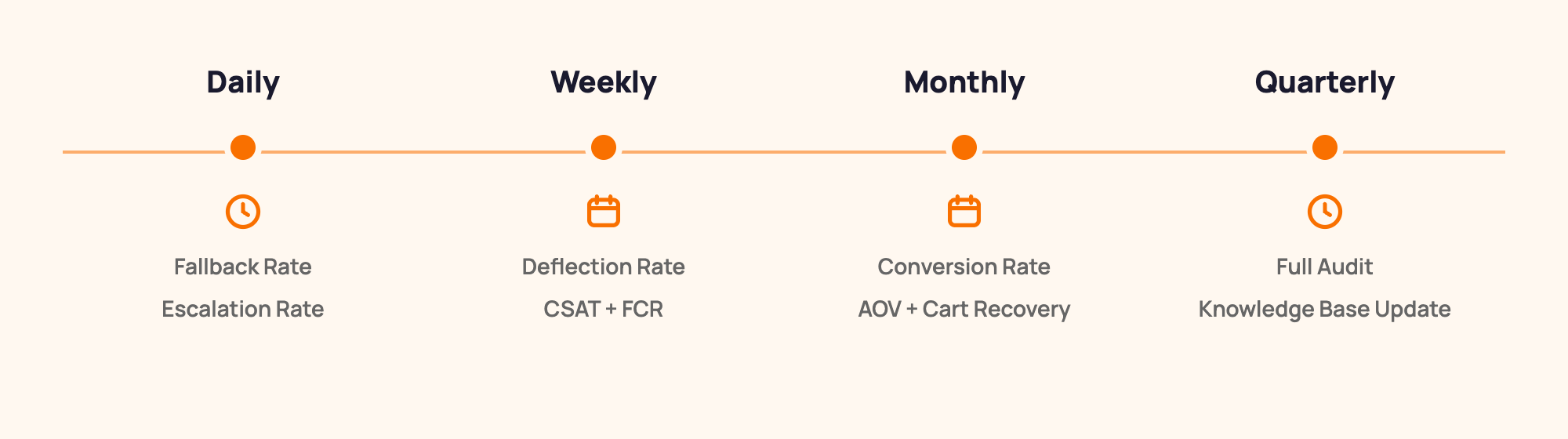
Daily (first two weeks after launch): check fallback rate and escalation rate. These are your early-warning signals. Any sudden spike indicates a training gap or a configuration error that needs immediate attention.
Weekly (ongoing): review deflection rate, FCR, and CSAT. These move more slowly and meaningful trends take 5-7 days to appear clearly. Weekly review also gives you enough data to distinguish a real trend from a one-day anomaly.
Monthly: review Tier 2 revenue metrics: chatbot-assisted conversion rate, AOV, and cart recovery rate. These require enough transaction volume to be statistically meaningful. Also do a monthly audit of the top fallback topics to identify new training opportunities.
Quarterly: run a full chatbot audit. Test it against your current product range, updated policies, and seasonal changes. Update the knowledge base before BFCM, holiday season, and any major product launch. A chatbot trained in January on your summer collection is going to fail in November.
Frequently asked questions about AI chatbot metrics
What are examples of AI chatbot metrics?
The most important AI chatbot metrics for Shopify stores are: deflection rate (percentage of queries resolved without human involvement), first contact resolution (queries resolved in a single conversation), CSAT (customer satisfaction rating after the interaction), escalation rate (conversations transferred to a human agent), chatbot-assisted conversion rate (purchase rate for sessions where the chatbot was active), and AOV on chatbot sessions (average order value where the chatbot contributed to the session).
What is a good deflection rate for a chatbot?
A deflection rate of 40-65% is a realistic target for most Shopify stores within the first 60 days, assuming the chatbot is trained on the store's specific data. Generic out-of-the-box chatbots typically achieve 20-30%. Well-trained chatbots with comprehensive knowledge bases covering FAQ, order tracking, and returns can reach 70-80% on routine query types.
How do I measure chatbot ROI for my Shopify store?
Chatbot ROI for a Shopify store has two components: support savings (number of deflected tickets multiplied by your agent's average cost per ticket) and revenue contribution (chatbot-attributed orders and AOV uplift on chatbot sessions). For a detailed calculation framework, see: How to Calculate the ROI of Your AI Chatbot.
How often should I check chatbot metrics?
Check fallback rate and escalation rate daily for the first two weeks after launch. Review deflection rate, FCR, and CSAT weekly on an ongoing basis. Review revenue metrics monthly: chatbot-assisted conversion rate, AOV, and cart recovery rate. Run a full knowledge base audit quarterly, and always before BFCM, holiday season, or a major product launch.
Tracking the right metrics is what separates a chatbot that's installed from one that's optimized. The numbers above tell you exactly what's working, what isn't, and what to change first.
For the full picture on what AI chatbots can do for your Shopify store, see our complete guide to AI chatbots for ecommerce. For the support angle specifically, see: AI Chatbot for Customer Support: How to Cut Support Tickets by 50%.
Try MooseDesk
AI chatbot, live chat, and helpdesk in one Shopify-native app.
Free plan available. 1-min setup. 24/7 Support.