
AI chatbot for customer support: How to cut support tickets by 50%
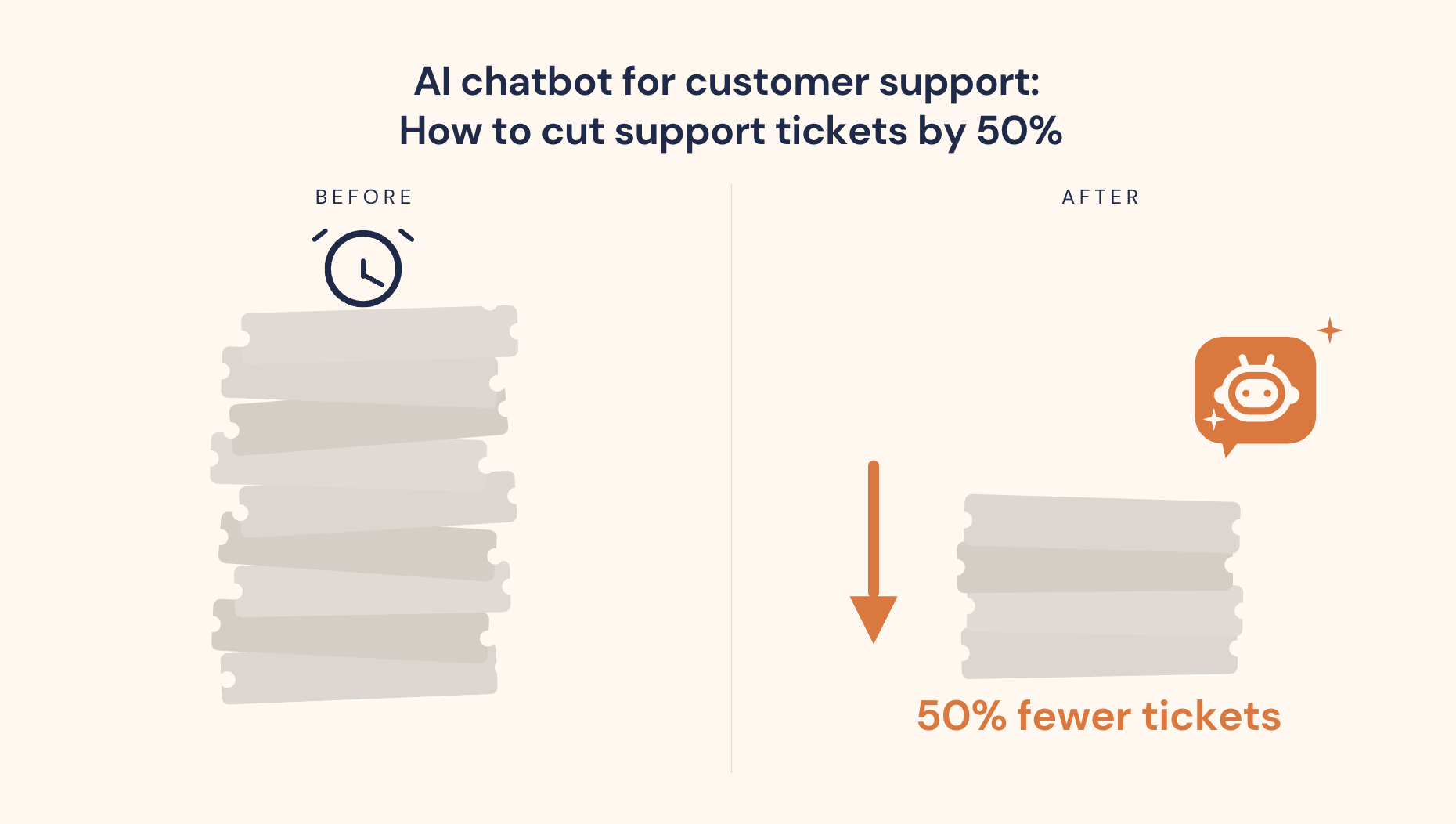
Table of contents
If your support inbox looks the same at 6 PM as it did at 9 AM, you're not dealing with a staffing problem. You're dealing with a volume problem, and most of it is the same handful of questions repeated hundreds of times a month.
Automating customer service handles the repeat questions so your team can focus on the ones that actually need a human. For most Shopify stores, automating the top ticket categories reduces total manual ticket volume by 50% or more. This article covers exactly how, starting with whether 50% is realistic for your store, which ticket types to automate first, and how to set it up.
For how the technology behind this works, see: How AI chatbots work for ecommerce customer support.
Is 50% ticket reduction actually realistic?
Yes, and for most Shopify stores it's conservative. Here's the evidence.
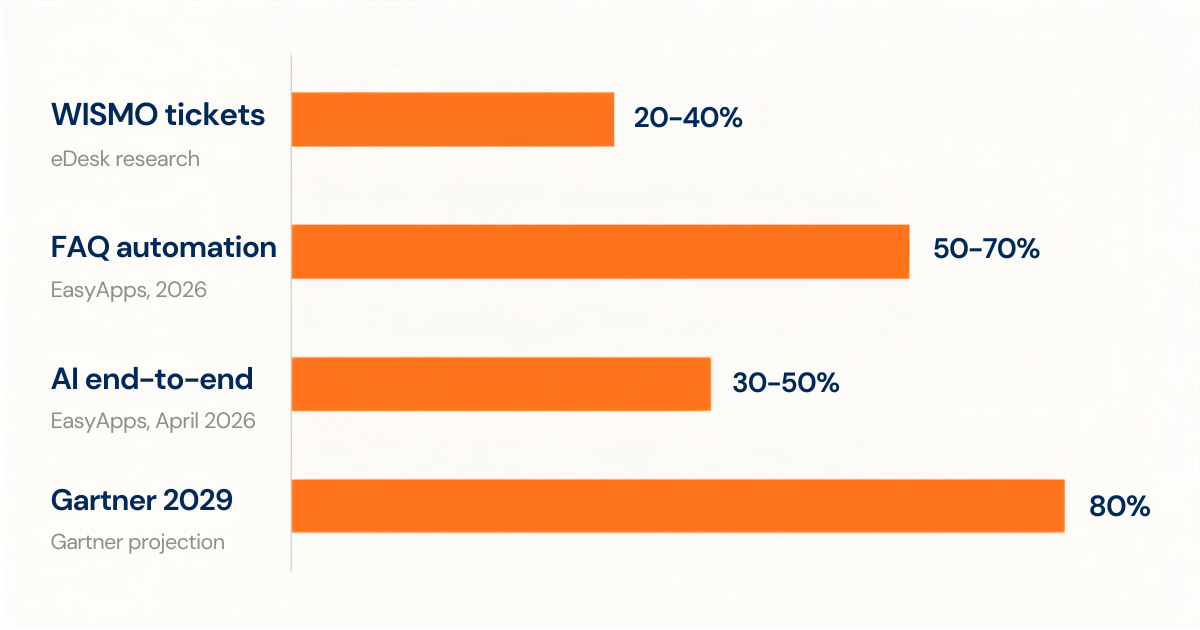
WISMO queries alone account for 20-40% of all support tickets in ecommerce, rising above 50% during BFCM and peak periods, according to eDesk's research on ecommerce support automation. WISMO stands for "Where Is My Order?", the single most common customer question in ecommerce, and also the most automatable. Connecting an AI chatbot to Shopify's order management system handles this entire category automatically, with no human agent involved.
Automating answers to the top 10 most common questions eliminates 50-70% of manual ticket volume, according to EasyApps' research on Shopify support automation. Most Shopify stores have fewer than 15 questions that account for the vast majority of incoming queries. Getting accurate answers to those 15 questions into a chatbot knowledge base is a few hours of work that pays off immediately.
In 2026, AI handles 30-50% of support interactions end-to-end without human involvement for Shopify stores using properly configured chatbots (EasyApps Shopify support automation guide, April 2026). That number was closer to 20% in 2024. The tools have improved significantly.
Gartner projects agentic AI will autonomously resolve 80% of common customer service issues without human intervention by 2029. The trajectory is already visible in current deployments.
The key variable in all of these benchmarks is training quality. A generic chatbot with no store-specific data underperforms significantly. A chatbot trained on your actual products, policies, and customer phrasing performs at the upper end of these ranges. The 50% headline is realistic for a properly configured setup. It is not realistic for an out-of-the-box installation left on default settings.
The 4 ticket types to automate first (In order of impact)
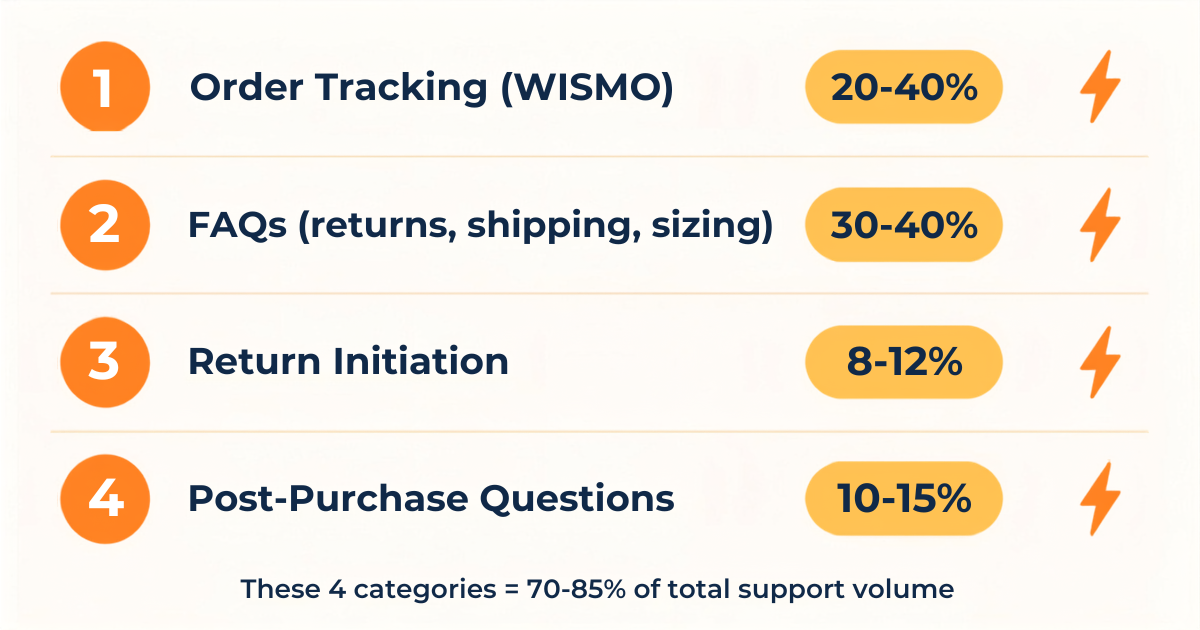
Not all tickets are equally automatable. These four categories account for 70-85% of the average Shopify store's support volume. Automate them in this order.
1. Order tracking (WISMO): 20-40% of tickets (over 50% during peak)
This is where you start, every time. The resolution flow is simple: the customer asks about their order, the chatbot queries Shopify's order management API, retrieves the current tracking status, and replies instantly. When the system detects an exception such as a delay or a lost shipment, it routes to a human agent with the context pre-loaded.
A store processing 500 orders per month with a 15% WISMO query rate generates 75 WISMO tickets per month. Chatbot automation handles all 75 automatically, from day one of deployment. That's roughly 3-4 hours of agent time returned to the team every month from a single workflow.
2. FAQs: 30-40% of tickets combined
Return policy, shipping times to specific regions, sizing guides, how to apply a discount code, whether international shipping is available. These are the questions your team answers identically every single time. A chatbot trained on your store's specific answers handles them with zero human involvement.
The most common failure mode here is outdated information. If your chatbot says free shipping applies over $50 but your policy recently changed to $75, every wrong answer erodes trust and creates follow-up tickets. Training accuracy matters more than training volume.
3. Return initiation: 8-12% of tickets
Most merchants still handle this manually: customer emails, agent checks eligibility, agent sends the return label. A chatbot connected to your return policy and order data handles the entire flow automatically. It checks eligibility, generates a return label, sends confirmation, and closes the ticket. The human team only sees the exceptions: outside the return window, damaged goods claims, potential fraud flags.
This is one of the highest-ROI automations available because it removes a multi-step back-and-forth that typically takes 3-5 agent messages to resolve.
4. Post-purchase questions: 10-15% of tickets
"Did my order go through?", "Can I change my address before it ships?", "I ordered the wrong size, what do I do?" All of these have defined answers and defined workflows. A chatbot handles the inquiry, confirms the status from Shopify's order data, and either resolves it automatically or routes to the relevant team member with full context attached.
Automating these four categories accounts for 70-85% of the average Shopify store's support ticket volume. The 50% headline reduction is actually conservative once all four are running.
How to set up sustomer service automation on Shopify
The full installation guide lives here: How to Add Live Chat and AI Chatbot to Your Shopify Store. This section covers the automation-specific setup steps that determine whether you automate customer service at 30% ticket reduction or 60%.
Step 1: Audit your ticket data first. Pull the last 30 days of tickets from your helpdesk or inbox. Categorise them manually: WISMO, FAQ, return initiation, post-purchase, and everything else. Count the totals. This gives you your store's actual automation opportunity, not a benchmark. A store where WISMO is 45% of tickets has a different priority than one where it's 15%.
Step 2: Choose a Shopify-native app. The chatbot needs native access to your Shopify order data to answer WISMO queries accurately. Apps that require a third-party API sync or manual data export introduce a lag that makes order tracking answers unreliable. Look for: direct Shopify order access, no-code knowledge base setup, and human handoff with context transfer. MooseDesk is built to this spec: Shopify-native, no-code setup, AI chatbot and helpdesk in one app.
More than 10 years of building for Shopify merchants, and since MooseDesk launched in 2023, we've watched a lot of chatbot setups start strong and plateau. The ones that plateau almost always share the same root cause: the merchant set up the tool but skipped the audit step. They trained the bot on what they thought customers were asking rather than what the ticket logs actually showed. Running the 30-day ticket audit first changes the output dramatically. When you train on real customer language rather than cleaned-up FAQ copy, the bot recognises the actual phrasing your customers use, and that gap between polished FAQ language and how real people type is larger than most merchants expect.
Step 3: Train on your top 15 questions first. Use the actual customer phrasing from your ticket history, not a cleaned-up version. "do u ship to canada" and "international shipping?" are the same question, but the chatbot needs to recognise both. Your team's inbox is your training dataset.
Step 4: Configure WISMO automation first. Connect the chatbot to Shopify's order management and test it with 10 real order numbers. Check that tracking data is accurate, that exception routing fires correctly, and that the response tone matches your brand. This single step typically handles 20-40% of your ticket volume from day one.
Step 5: Run for two weeks, then retrain. Check the chatbot logs daily in the first two weeks. Every question it couldn't answer is a training gap. Add those questions using the customer's exact phrasing and retest. Most merchants close 80-90% of their training gaps within the first three weeks of active refinement.
What customer service automation can't do
A common concern: will it feel robotic? The honest answer is: only if it's poorly trained.
A chatbot that gives accurate, specific answers in your store's tone doesn't feel robotic to a customer. It feels fast. The robotic experience comes from generic responses, wrong information, and failure to escalate when the situation is beyond the bot's capability. Those are training and configuration problems, not technology problems.
What automation genuinely handles badly:
- Complex disputes requiring empathy. A customer who received a damaged product and is upset needs a human response, not an automated resolution flow. The chatbot should detect the emotional signal and escalate immediately.
- Edge cases outside its training. If a customer asks something the bot hasn't been trained on, it should say so clearly and route to a human rather than guess. A wrong answer is worse than "I'll get a human to help with this."
- Policy exceptions that require a judgment call. Approving a return outside the return window, offering goodwill gestures, or handling fraud disputes all require human authority. The chatbot can acknowledge the request and escalate; it shouldn't attempt to decide.
- High-value relationship management. For your top customers or large orders, a personal human response is worth more than the time saved by automation. Configure the chatbot to route VIP customers directly.
The right model is a bot that handles the routine volume (the predictable 60-80%) so your human team is fully present for the 20-40% that genuinely needs them. A merchant who used to spend four hours a day on support can realistically get to 45 minutes of high-value human interaction once automation is properly configured.
Measuring your automation results
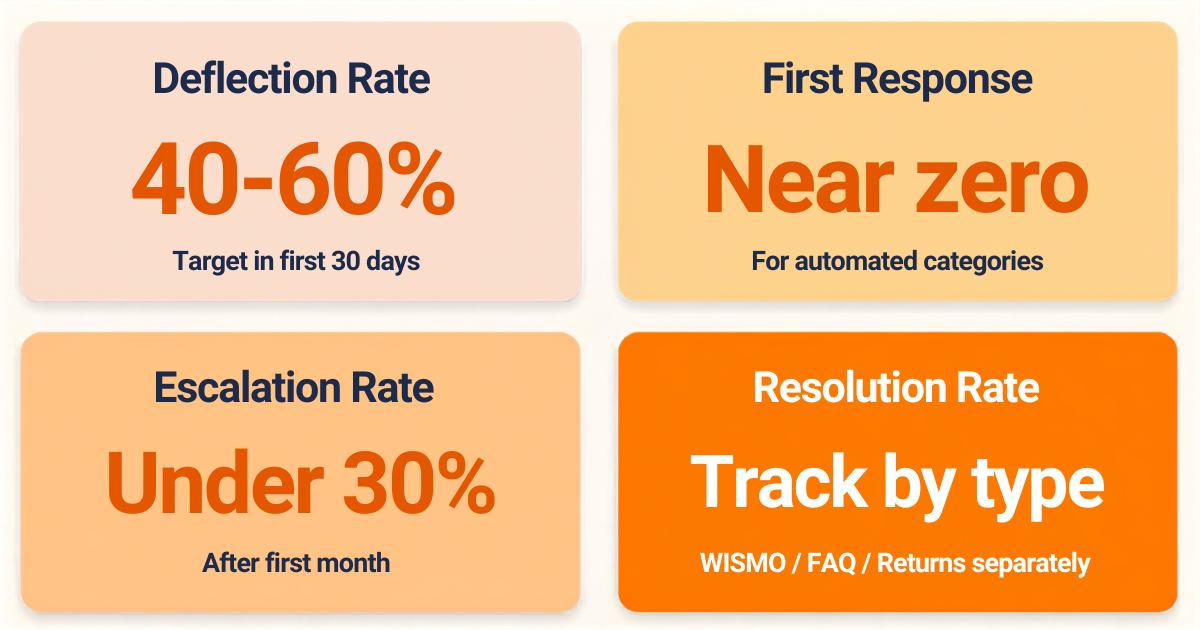
Watching total chat volume increase is not a support metric. These four numbers tell you whether the automation is actually working.
1. Ticket deflection rate. Total tickets handled by the chatbot divided by total incoming queries. Target: 40-60% within the first 30 days for a properly trained bot. Below 30% after 4 weeks means the training needs significant work.
2. First response time. How long before a customer gets any reply. For automated categories, this should drop to near-zero from day one. If first response time on WISMO queries is still measured in hours, the WISMO automation isn't working correctly.
3. Human escalation rate. The percentage of conversations that get transferred to a human agent. Target: under 30% after the first month of refinement. Above 50% suggests the chatbot is either under-trained or the handoff triggers are too sensitive.
4. Resolution rate per ticket type. Track WISMO separately from FAQs separately from returns. This tells you which specific automation flows need more training versus which are performing well. A store with 80% WISMO resolution and 30% FAQ resolution has a clear training priority.
Review cycle: check logs daily for the first two weeks, then weekly. The average merchant closes most of their obvious training gaps within three weeks of launch.
Frequently asked questions about customer service automation
How much can an AI chatbot reduce support tickets?
For most Shopify stores, a properly trained AI chatbot reduces manual ticket volume by 40-65% within the first 30 to 60 days. The key variables are how much of your ticket volume falls into automatable categories (WISMO, FAQs, return initiation, post-purchase questions) and how accurately the chatbot is trained on your store's specific data. According to EasyApps' research on Shopify support automation, stores that automate answers to their top 10 most common questions typically see 50-70% deflection from those categories alone.
Will automated customer service feel robotic to my customers?
Only if the chatbot is poorly trained. A chatbot giving accurate, specific answers in your brand's tone doesn't feel robotic. It feels fast and competent. The robotic experience comes from generic responses, outdated information, and failure to escalate appropriately. All of which are training and configuration problems, not technology problems. Most merchants who report a robotic feel are running an out-of-the-box chatbot with no store-specific training applied.
What is the best AI chatbot for customer service on Shopify?
Look for a Shopify-native app with real-time order data access, no-code knowledge base setup, and both AI chatbot and live chat in one tool. The order data access is the most important criterion for WISMO automation, since it's the largest automatable ticket category for most stores. For a full comparison, see our guide: Best AI Chatbot Apps for Shopify.
Can I automate customer service for free?
Yes. Several Shopify chatbot apps offer free plans with limited conversation volume. Free tiers are a reasonable starting point for stores with lower ticket volumes, and they let you test whether the training approach works before committing to a paid plan. Most stores with meaningful support volume outgrow free plans within a few months as automation flows expand and conversation volume increases.
The 50% ticket reduction isn't a marketing claim. It's a realistic outcome for stores that identify their highest-volume ticket categories, train a chatbot specifically on their store's data, and spend two to three weeks refining based on real conversation logs. The work required to get there is measured in hours, not months.
Automation handles the tickets. You handle the business. For a full picture of what AI chatbots can do beyond support, see how they drive sales for Shopify stores, or see our complete guide to AI chatbots for ecommerce.
MooseDesk handles the tickets. You handle the business. AI chatbot, live chat, and helpdesk in one Shopify-native app, connected to your orders and trained on your store from day one.
Try MooseDesk
AI chatbot, live chat, and helpdesk in one Shopify-native app.
Free plan available. 1-min setup. 24/7 Support.